Reviewing the Groundswell

One danger of reviewing a book is the reality that the reviews ultimately say more about the reviewer, and the book he or she wishes had been written, than they do about the book which actually was written. It’s in that context that I offer this review of Groundswell, by Forrester Research analysts Charlene Li and Josh Bernoff, published by Harvard Business Press (note: disclaimers at the end of the post).

Winning in a World Transformed by Social Technologies

To start with the positive: This is a really solid business book, which sets out a clear methodology (including the Social Technographics Profile and the POST method with which Forrester clients / subscribers are already familiar), walks through a broad range of well explained case studies, and situates the business benefits of the different approaches.

Continue reading →

Things are going to get wierder

Via Jake McKee I just discovered this video of Chris Heuer interviewing Clay Shirky:

Clay’s long been a favorite speaker of mine – Perl as an act of love and the cognitive surplus being two other videos featured here – and Chris does a great interview here.

My favorite quote, as you might suspect given the tagline of this blog: “Things are going to get wierder before they get saner.” We’re in the midst of a long transformation – we’ve left point A but point B won’t be clear for some time.

On the Internet, People Know if you’re a dog

(Update, 2pm ET: Scott Hintz from TripIt replied in the comments on the original post apologizing for the employee’s behavior – thanks Scott.)

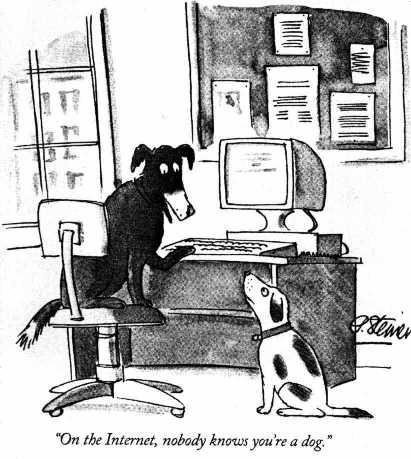
One of the famous cartoons of the first internet craze was this one from the New Yorker:

On the Internet Nobody Knows You\'re a Dog
On the Internet Nobody Knows You're a Dog

The reality is, however, that increasingly people’s online identity can be mapped to their offline identity. (Check out Who Controls the Internet? for a well informed and very smart extended exploration on what this means from a legal perspective, and this reality checkfrom UNC).

Earlier this week, I wrote a blog post about TripIt and Dopplr, two major companies in the social travel market, which people use to share information about various trips they are taking or planning. It was a perfectly innocuous post, describing some of Dopplr’s new features which make it more like TripIt, and presumably more competitive with TripIt as a result.

That post recieved the following comment, from someone identifying himself as Thomas, with an email address at Yahoo! mail, and no url:

Well, in regards to Dopplr’s generic email import approach, I’ve tried forwarding several different emails I have from my company, travel agent, and from major airlines such as American Airlines, but they don’t work one bit. For example, Dopplr thinks I’m going to different places in Europe when I send in my opentable reservation.

In contrast, most of these work “out of the box” with TripIt. And when I complained about my travel agent not being supported, they added it within a day.

What’s more, is that I don’t really want to “discover” people I do not know on a trip. All I’ve been wanting to do is to manage my business travels better and inform my family. TripIt fits that bill perfectly.

So, I don’t really find Dopplr very useful. My two cents.

Thanks for the nice write-up though.

Best,
Thomas

Not itself a controversial comment, and I almost approved it without a second thought. But then I noticed that the IP address from which the comment was posted (69.12.150.246) is mapped to a machine called wall.tripitinc.com:

jeckman$ nslookup 69.12.150.246

Non-authoritative answer:
246.150.12.69.in-addr.arpa name = wall.tripitinc.com.

(I would likely not have even noticed, but either WordPress itself or one of my plugins actually adds that info to the email it sends me letting me know that a comment has been recieved and is awaiting moderation).

So I emailed “Thomas” – using the yahoo.com address he provided – and suggested he disclose that in his comment.

I never heard back – perhaps the email wasn’t valid to begin with. So, I decided to post the comment, but also note what I had determined about its origin.

Lesson learned? It’s easier than you think to determine who you are when you do various things on the net. If you’re going to post comments on blogs that discussion your product(s), disclose your relationships. Nothing wrong with posting – I’ve had many comments from folks whose products/services I discuss in blog posts – but posting a comment like the above without disclosure is basically astroturfing, and it never works.

Some people out there in our nation don’t have maps

An oldie but a goodie. The folks at ROFLCON just announced that Miss Teen USA South Carolina will be the emcee at the upcoming SF-ROFL thing (August 29th).

Unfortunately I don’t think I will be able to get to this one – and not because I can’t find San Francisco on my map. Unlike many U.S. Americans I believe in building up our future for our children and that our education here should help the Iraq and the Asian countries. ;)

Dopplr gets Email, Twitter, SMS import

One of the more popular posts on this blog is the one which describes how to import trips from TripIt into Dopplr, in order to avoid the re-entry tax. After all, as I wrote in my comparison of the two services last October, TripIt‘s email import was the critical factor in my decision of how to manage this information:

Tripit’s mechanism for adding trips is superior. The ability to simply forward (or even set an automatic rule to forward) confirmation emails is a major step forward . . . Where TripIt seems better at pulling data in, Dopplr seems to be better so far at pushing their data out, or letting people pull it into other contexts.

Well, now Dopplr’s gone and added some new import mechanisms of their own. This post from the Dopplr blog (ok, it was posted back on July 8th, but it has been sitting in my queue to write about) lays out three new options: Twitter, SMS, and Email:

Today I’m really happy to say we’re taking the wraps off a number of new ways to get your future into Dopplr and share your travel information with those you trust: Dopplr by Twitter, SMS and… Email!

Dopplr Blog

Although I love twitter as a notification service (a way of letting me know something relevant happened) I don’t see myself using it as a data input service. For those of you who would like to, just follow the dopplr user and send direct messages with your trips, like: d dopplr a trip to London July 28th to August 3rd. (Nicely, it also happily accepts @dopplr posts, in case you want to announce your trips as well as put them in dopplr). SMS is another option – you associate your SMS number with your Dopplr account and you can text message the same types of messages to Dopplr’s number.

Finally, they’ve got email working at trips@dopplr.com (wonder how many people will confuse plans@tripit.com with trips@dopplr.com – did they make plans@dopplr.com an alias?).

Interestingly, you can use the same kind of shorthand messages used for Twitter or SMS – “a trip to London July 28th to August 3rd” – or you can forward confirmation messages from booking services (which is how TripIt handles import). This is because Dopplr did not set out to parse all the complex formats used by different agencies, but took a simper approach, as explained by MattB:

There are an awful lot of ways to format a travel itinerary. When people asked us to extract trips from emails, we looked at our long history of e-tickets, confirmations and reservations, and scratched our heads.

Inspiration came in the shape of Apple’s last OS X release, Leopard, and an intriguing feature called “Data detectors“.

We realised that instead of creating a piece of code to decode every email format out there, we could look for patterns of dates and place names in the text (and later, other information too) and turn those into trips.

A happy side-effect of this approach is that as well as extracting information from automatic reservation emails, it works well with short text strings like “I’ll be in San Francisco from 3rd July to 7th July”. This means we can work with many hand-written emails, with Twitters, and with SMSes too.

Of course it won’t work with every variation under the sun (for example, it’s most reliable when an email contains just a return trip in a single hop), but we’ve had very satisfying results in our testing. And of course every email you send us will be added to our test suite so that our engine can get better and better over time.

In other words, rather than specifically targeting all the different potential formats, and parsing them in some structured way, Dopplr looks for some specific patterns in the text and tries to understand their meaning without knowing the format of the email in advance.

I wonder how different this is from what TripIt actually does behind the scenes – how much they plan for specific formats they know in advance – and how successful it will be “in the field.” For now it is enough to convince me to turn off my automated importing and give trips@dopplr.com a try on my next few confirm messages. Then, I can automate a rule in my email such that travel confirmations get auto-forwarded to both plans@tripit.com and trips@dopplr.com, and be sharing my travel plans painlessly.